1. Introduction: Why Accurate Work Hours Calculation Matters
Payroll errors are an invisible hemorrhage draining businesses worldwide. American companies alone pay more than $4.5 billion in annual penalties to the IRS due to payroll compliance failures — and the average cost of correcting a single payroll error runs to $291 per incident. These numbers represent real money leaving real businesses, often because of a miscalculated break, a misread time card, or a decimal conversion done wrong.
For employees, the stakes are equally personal: every 15-minute rounding error costs a worker earning $20/hour exactly $5.00 per day — compounding to $1,300 per year in lost wages. And for freelancers billing hourly clients, a systematic 6-minute undercount across 250 billable days means giving away 25 hours of free labor annually.
This guide provides a comprehensive, mathematically rigorous framework for understanding work hours calculation at every level — from manual arithmetic to digital automation. Whether you’re an employee verifying a paycheck, a manager processing payroll for 50 people, or a freelancer invoicing international clients, the principles covered here will ensure every hour is accounted for accurately.
Calculate work hours between any two times. Supports break deduction, decimal conversion, and overnight shifts.
2. Understanding Time Formats — The Foundation
Before calculating anything, you need to understand the two time systems used in work hours tracking:
12-Hour Clock (AM/PM)
The standard civilian format in the United States, Canada, Australia, and parts of Latin America. Hours run from 12:00 AM (midnight) through 12:00 PM (noon) and back to 11:59 PM. The critical pitfall: 12:00 PM is noon, not midnight — a mistake that causes more payroll errors than any mathematical miscalculation.
24-Hour Clock (Military Time)
The format preferred by the military, aviation, healthcare, and most payroll systems worldwide. Hours run from 00:00 (midnight) through 23:59 (11:59 PM). No AM/PM ambiguity. Conversion rule: for any PM time, add 12 to the hour (5:00 PM = 17:00). For 12:00 PM, keep as 12:00. For 12:00 AM, convert to 00:00.
Quick Conversion Reference
| 12-Hour | 24-Hour | 12-Hour | 24-Hour | |
|---|---|---|---|---|
| 12:00 AM | 00:00 | 12:00 PM | 12:00 | |
| 1:00 AM | 01:00 | 1:00 PM | 13:00 | |
| 6:00 AM | 06:00 | 6:00 PM | 18:00 | |
| 9:00 AM | 09:00 | 9:00 PM | 21:00 | |
| 11:00 AM | 11:00 | 11:00 PM | 23:00 |
Pro tip: Payroll professionals universally recommend using 24-hour format for time tracking because it eliminates the single most common source of manual entry errors — AM/PM confusion.
3. Manual Work Hours Calculation — Step by Step
Despite growing reliance on automation, knowing how to calculate work hours manually remains a critical analytical skill — it helps managers spot discrepancies and auditors verify system outputs.
The Core Formula
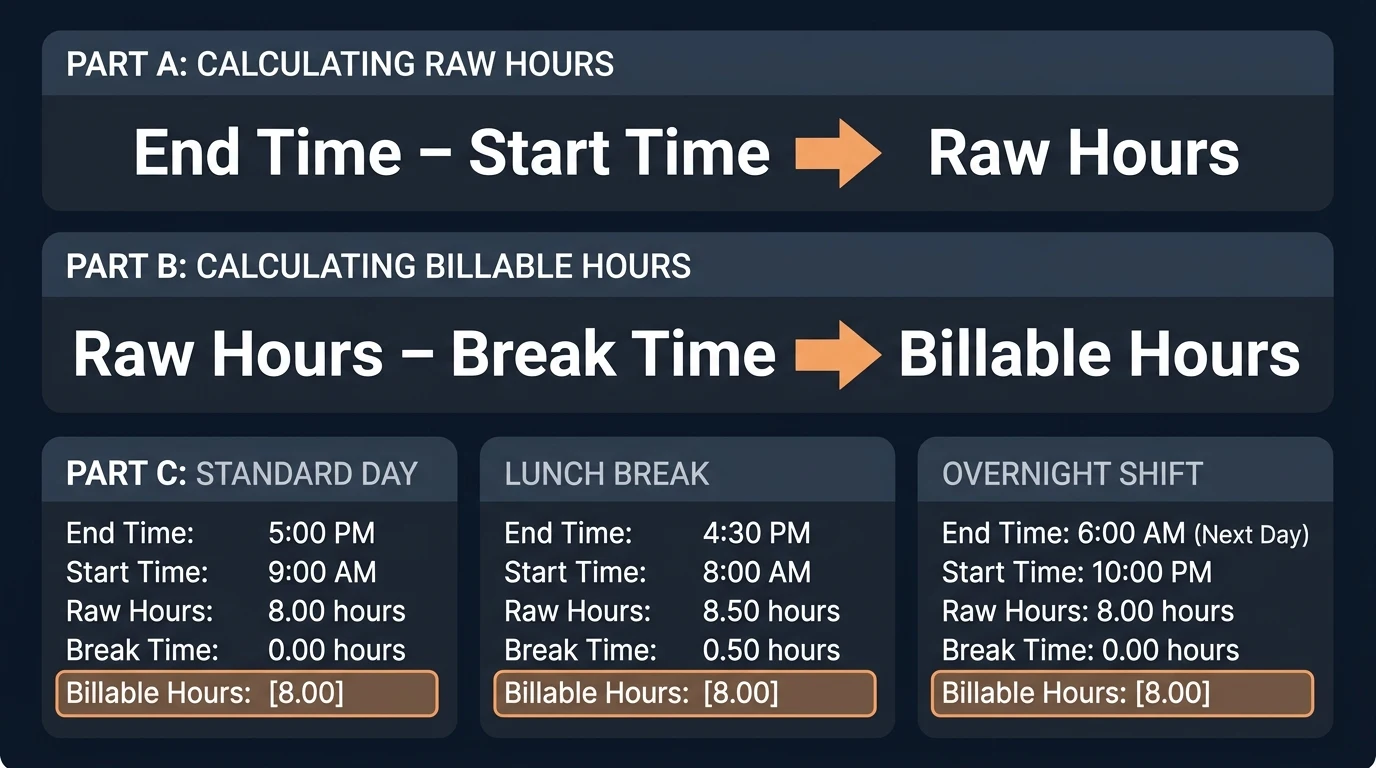
$$\text{Work Hours} = \text{End Time} − \text{Start Time} − \text{Unpaid Breaks}$$
Example 1: Standard Day Shift
- Start: 8:00 AM (08:00) → End: 4:30 PM (16:30)
- Calculation: 16:30 − 08:00 = 8 hours 30 minutes
- No break deducted → Net: 8.5 hours
Example 2: With Lunch Break
- Start: 9:00 AM → End: 5:30 PM
- Raw: 5:30 PM − 9:00 AM = 8 hours 30 minutes
- Minus 30-minute unpaid lunch → Net: 8 hours 0 minutes (8.0 hours)
Example 3: Overnight Shift (Crossing Midnight)
- Start: 10:00 PM (22:00) → End: 6:30 AM (06:30)
- Method: (24:00 − 22:00) + 06:30 = 2:00 + 6:30 = 8 hours 30 minutes
Example 4: Irregular Minutes
- Start: 7:45 AM → End: 3:20 PM
- Hours: 15 − 7 = 8 hours
- Minutes: 20 − 45 = −25 minutes → Borrow 1 hour: 7 hours + (60 − 25) = 7 hours 35 minutes
- Net: 7 hours 35 minutes (7.583 decimal hours)
When to use manual vs. calculator: Use mental math or paper calculation to spot-check a single shift or audit a suspicious entry. For processing payroll across a team or an entire pay period, always delegate to an automated hours calculator — human fatigue multiplies errors exponentially.
📚 Precision in time tracking starts with precision in thinking. Deep Work by Cal Newport is the definitive guide to producing your best work — and understanding why every hour of focused effort counts. Paperback, ~$9.
4. Using the Hours Calculator Tool
Our free hours calculator eliminates the manual work entirely:
Step 1 — Select Clock Format: Choose between 12-hour (AM/PM) or 24-hour format based on your preference.
Step 2 — Enter Start Time: Input the hour and minute of your shift start (clock-in time). Use the “Now” button to auto-fill the current time.
Step 3 — Enter End Time: Input your shift end (clock-out time). The calculator handles overnight shifts automatically.
Step 4 — Add Break Time (Optional): Enter unpaid break duration in minutes. Common values: 15 minutes (short break), 30 minutes (standard lunch), 60 minutes (full hour lunch).
Step 5 — Click Calculate: The tool instantly displays:
- Total Work Hours in hours:minutes format
- Decimal Hours for payroll processing
- Total Minutes for detailed tracking
- Full Breakdown showing raw time, break deductions, and final calculations
Quick Presets: Use the built-in presets for common shifts — 9-5, 8-5 with 30-minute lunch, or 9-6 with 1-hour lunch.
Enter clock in/out times, deduct breaks, and get decimal hours for payroll — all in one click.
5. Time Card Calculator Deep Dive
The time card is both a financial instrument and a legal document — it is the primary link between employee effort and employer compensation.
What Is a Time Card? — Evolution from Paper to Digital
Historically, a time card was a rigid paper card an employee inserted into a mechanical punch clock to stamp arrival and departure times. Today’s clock-in/clock-out systems have evolved dramatically:
| Generation | Method | Accuracy | Fraud Risk |
|---|---|---|---|
| 1st Gen | Paper time cards + punch clocks | Low (manual entry) | High (buddy punching) |
| 2nd Gen | Magnetic swipe cards | Medium | Medium |
| 3rd Gen | Biometric scanners (fingerprint, facial) | High | Very Low |
| 4th Gen | GPS + mobile app tracking | Very High | Minimal |
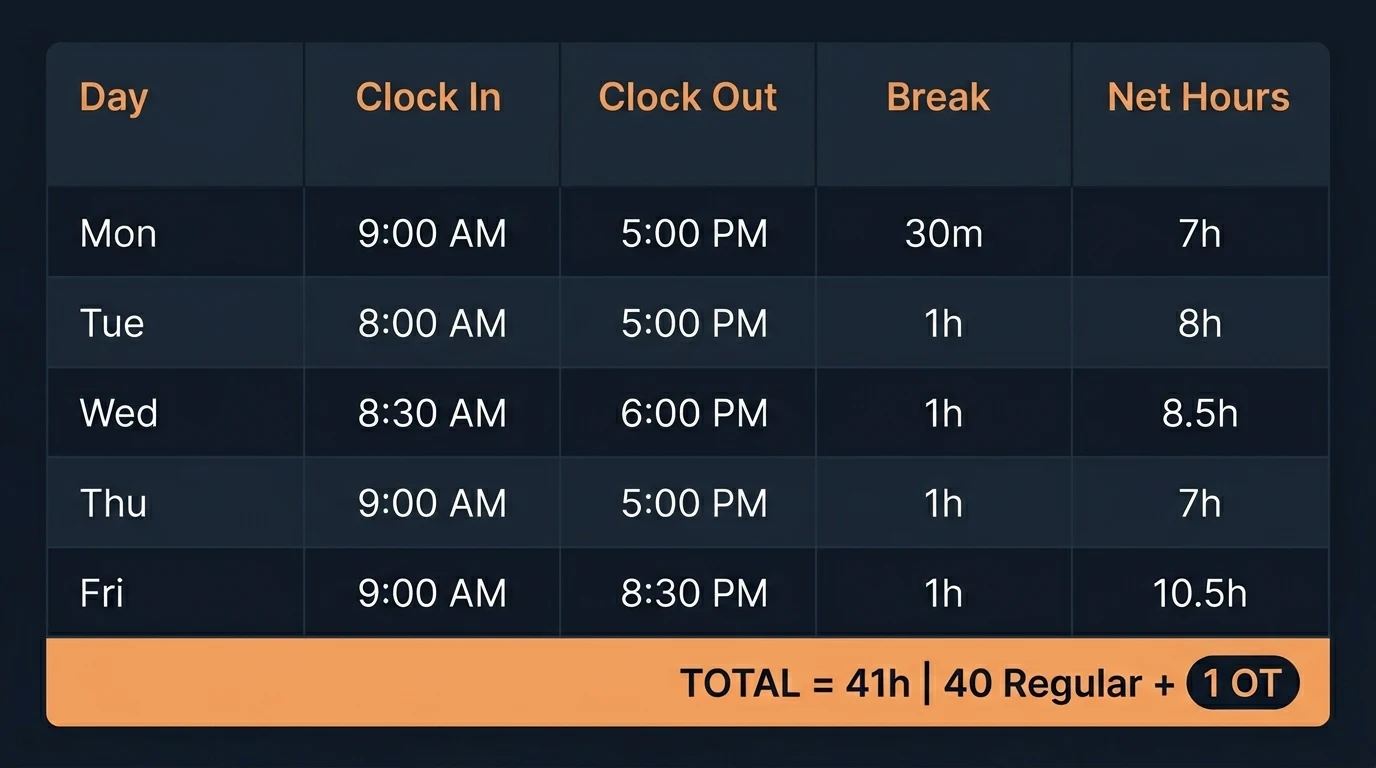
Weekly Time Card Example
| Day | Clock In | Clock Out | Break | Net Hours |
|---|---|---|---|---|
| Mon | 8:00 AM | 5:00 PM | 30 min | 8.5 |
| Tue | 8:15 AM | 5:15 PM | 30 min | 8.5 |
| Wed | 7:45 AM | 4:45 PM | 30 min | 8.5 |
| Thu | 8:00 AM | 5:30 PM | 30 min | 9.0 |
| Fri | 8:00 AM | 4:30 PM | 30 min | 8.0 |
| TOTAL | 42.5 |
The calculator splits this automatically: 40 regular hours + 2.5 overtime hours.
Bi-Weekly Calculations and FLSA
For bi-weekly pay cycles (14 consecutive days), the FLSA requires evaluating overtime per individual 7-day workweek — not averaging across both weeks. If an employee works 45 hours in Week 1 and 35 hours in Week 2 (total: 80 hours), a compliant time card calculator will identify 5 overtime hours in Week 1 rather than averaging to 40/week and missing the obligation.
Printable Time Cards and Best Practices
Despite full digitization, many companies retain printable time cards as an audit backup. Best practice: require employees to review and sign their time cards before payroll processing. Employee sign-off drastically reduces disputes and creates a legally defensible paper trail for any future labor investigation.
6. Decimal Hours Conversion — The Bridge Between Time and Money
Decimal hours conversion is where time becomes money. Without this translation, the entire payroll calculation chain breaks down.
Why Decimal Hours?
Time operates in base-60 (60 minutes per hour). Financial systems operate in base-10 (decimal). Without conversion, multiplication produces catastrophically wrong results.
The catastrophic error: An employee works 7 hours and 45 minutes. A manager enters “7.45” into the payroll system instead of the correct decimal value of 7.75. At $20/hour:
- Wrong: 7.45 × $20 = $149.00
- Correct: 7.75 × $20 = $155.00
- Error per shift: $6.00 → $1,560/year
The Conversion Formula
$$\text{Decimal Hours} = \text{Hours} + \frac{\text{Minutes}}{60}$$
Common Conversions Reference Table
| Minutes | Decimal | Minutes | Decimal | Minutes | Decimal | ||
|---|---|---|---|---|---|---|---|
| :00 | .00 | :20 | .33 | :40 | .67 | ||
| :05 | .08 | :25 | .42 | :45 | .75 | ||
| :10 | .17 | :30 | .50 | :50 | .83 | ||
| :15 | .25 | :35 | .58 | :55 | .92 |
The anchor points to memorize: :00 = .00, :15 = .25, :30 = .50, :45 = .75. Everything else falls between these landmarks.
Many HR platforms like QuickBooks Payroll and Gusto automate this conversion in the background — your team enters hours:minutes and the system handles all decimal math before calculating gross pay.
7. Payroll Hours Calculator
Payroll processing translates raw work hours into monetary compensation — and it must be done with regulatory-grade precision. The process involves more than simple multiplication.
Gross Pay Calculation
$$\text{Gross Pay} = (\text{Regular Hours} × \text{Hourly Rate}) + (\text{OT Hours} × \text{OT Rate})$$
Example: Full Payroll Cycle
- Employee: 43.5 hours worked, $18.00/hour
- Regular: 40 × $18.00 = $720.00
- Overtime: 3.5 × ($18.00 × 1.5) = 3.5 × $27.00 = $94.50
- Gross Pay: $814.50
Pay Period Structures
| Pay Period | Frequency | Paychecks/Year | Standard Hours |
|---|---|---|---|
| Weekly | Every 7 days | 52 | 40 |
| Bi-Weekly | Every 14 days | 26 | 80 |
| Semi-Monthly | 1st and 15th | 24 | 86.67 |
| Monthly | Once per month | 12 | 173.33 |
Payroll Frequency Structures
Weekly Payroll: Covers 7 consecutive days. Employees typically paid Friday. Overtime identified immediately the moment hours exceed 40 in that specific week.
Bi-Weekly Payroll: Pay every two weeks (26 payments per year). Standard benchmark is 80 hours per cycle. Despite the 2-week period, overtime must be evaluated and paid per individual 7-day workweek — a frequent compliance error that creates back-wage liability.
Semi-Monthly Payroll: Two fixed dates per month (e.g., 1st and 15th), for 24 annual payments. Because months have different day counts, hours per period are not equal. The standard conversion uses the 86.67-hour benchmark:
$$\frac{40 \text{ hrs/wk} \times 52 \text{ wks}}{24 \text{ pay periods}} = \frac{2{,}080}{24} = 86.67 \text{ hrs/period}$$
If a semi-monthly salary is $2,500, the derived hourly rate = $2,500 ÷ 86.67 = $28.84/hour.
FLSA Record-Keeping Requirements
| Record Type | Retention Period |
|---|---|
| Payroll records, wage agreements, pay rates | 3 years |
| Time cards, timesheets, wage deduction records | 2 years |
These retention timelines exist because the statute of limitations for wage claims under FLSA is 2 years (or 3 years for willful violations). Gaps in records eliminate your ability to defend against back-wage claims. Cloud payroll platforms like QuickBooks and Gusto automatically archive all required records for the full retention period.
8. Overtime Calculator
Overtime calculation is the single most litigated area of payroll compliance. Errors here become “wage theft” claims — expensive to defend even when unintentional.
Federal FLSA Overtime Rules
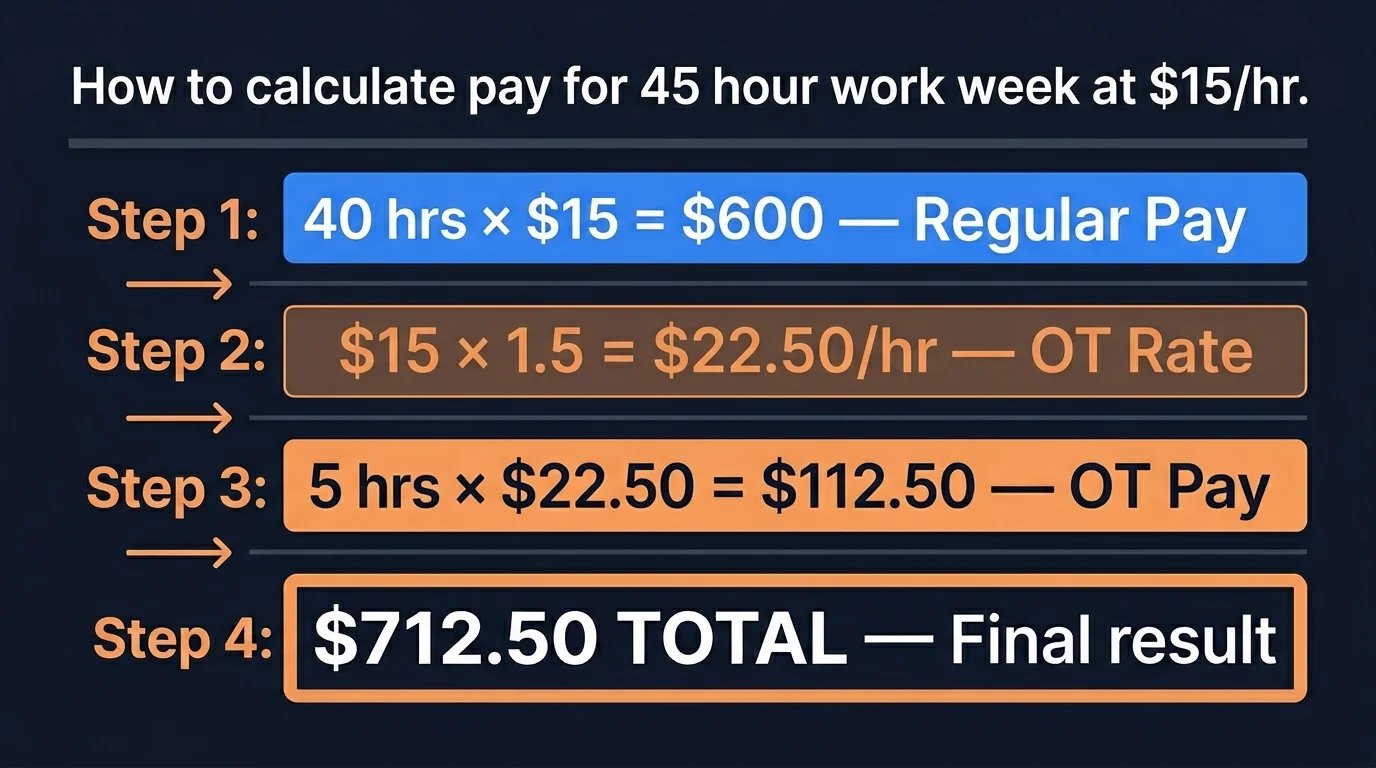
Under federal law, non-exempt employees earn overtime pay for any hours worked beyond 40 in a single workweek (defined as a fixed, recurring 168-hour period):
$$\text{OT Rate} = \text{Regular Rate} \times 1.5$$
State-Level Variations (Critical Compliance)
| State | Daily OT Trigger | Weekly OT Trigger | Double Time |
|---|---|---|---|
| Federal (FLSA) | None | >40 hrs | None |
| California | >8 hrs/day | >40 hrs/week | >12 hrs/day |
| Alaska | >8 hrs/day | >40 hrs/week | None |
| Colorado | >12 hrs/day | >40 hrs/week | None |
| Nevada | >8 hrs/day | >40 hrs/week | None |
California is the most complex: An employee working 10 hours on Monday earns 2 hours of overtime at 1.5× rate — regardless of whether they work fewer hours later in the week. If they work more than 12 hours in a single day, hours beyond 12 are paid at 2× rate (double time).
Overtime Calculation Example
Employee works 47 hours in one week, regular rate $22/hour:
- Regular pay: 40 × $22 = $880.00
- OT rate: $22 × 1.5 = $33.00
- OT pay: 7 × $33 = $231.00
- Total gross pay: $1,111.00
Weighted Average for Multiple Pay Rates
When an employee works at different rates within the same week:
- 25 hours at $15 + 20 hours at $20 = 45 total hours
- Weighted average: (25×$15 + 20×$20) ÷ 45 = $775 ÷ 45 = $17.22/hr
- OT rate: $17.22 × 1.5 = $25.83
- OT pay: 5 hours × $25.83 = $129.17
9. Time Tracking Methods Compared
Accurate payment begins with accurate tracking. The method used to capture employee hours directly impacts data quality, compliance exposure, and administrative overhead.
Method Comparison
| Feature | Paper/Manual | Spreadsheet | Digital App | Biometric |
|---|---|---|---|---|
| Cost | Very Low | Low | Medium | High |
| Accuracy | Low | Medium | High | Very High |
| Fraud Risk | High | Medium | Low | Minimal |
| Scalability | Poor | Fair | Excellent | Good |
| Compliance | Manual | Manual | Automated | Automated |
| Best For | <5 employees | Small teams | 5-500+ | High security |
Paper / Spreadsheet (Excel): Low initial cost, universally familiar, no software required. Drawbacks: data entry errors are frequent, aggregation is slow, analysis requires reformatting.
Digital (app-based): One-click time entry, automatic totals, instant reports, cloud backup, and integration with payroll software. Best for teams of 3+ or any freelancer billing multiple clients. Popular options include Toggl Track (free for up to 5 users) and Harvest (project billing + invoicing).
10. Timesheet Calculator Deep Dive
While time cards measure total attendance hours, a timesheet provides a deeper analytical perspective by tracking how those hours are distributed across specific tasks, projects, or clients.
What Is a Timesheet?
Timesheets are detailed records essential for organizations that rely on project-based accounting. Types include:
- Simple Timesheet: Documents daily attendance (clock in/out) only
- Project-Based Timesheet: Splits each workday into segments assigned to different projects — critical for cost analysis and profitability
- Client Billing Timesheet: Separates billable hours from non-billable hours — vital for freelancers, law firms, and advertising agencies
Timesheets are formatted either in traditional minutes (requiring later conversion) or in direct decimal notation. Free weekly, bi-weekly, and monthly timesheet templates are widely available for startups organizing their time tracking.
Digital vs. Paper Timesheets
Paper or Excel timesheets remain popular due to low initial cost, but they suffer from slow processing, difficult analysis, and high human error rates. Digital timesheets offer decisive advantages: automation, real-time reports, and dramatically reduced administrative overhead.
For freelancers and consulting teams needing project-focused tracking with client invoicing, platforms like Toggl Track provide one-click time tracking across web, desktop, and mobile — free for teams of up to 5 users, with advanced reporting starting at $9/user/month.
11. Hourly to Salary Calculator — The 2,080 Constant
Understanding the mathematical relationship between hourly wages and annual salary is essential for employees evaluating job offers and for employers structuring compensation budgets.
Why Convert?
Hourly work (subject to fluctuations, with overtime rights) differs fundamentally from fixed annual salary (stable income, but potentially overtime-exempt). Accurate conversion helps freelancers evaluate rates and employees compare offers on equal footing.
The 2,080-Hour Standard
The standard figure used in U.S. accounting and global HR practices is 2,080 work hours per year:
$$40 \text{ hrs/week} \times 52 \text{ weeks/year} = 2{,}080 \text{ hours/year}$$
Hourly → Annual:
- Employee earns $20/hour
- Annual salary = $20 × 2,080 = $41,600/year
Annual → Hourly:
- Employee earns $50,000/year
- Hourly rate = $50,000 ÷ 2,080 = $24.04/hour
Part-Time Adjustments
| Weekly Hours | Annual Hours | Annual Pay at $20/hr |
|---|---|---|
| 20 hours | 1,040 | $20,800 |
| 30 hours | 1,560 | $31,200 |
| 40 hours | 2,080 | $41,600 |
Hidden Benefits Consideration
When converting salary to hourly for comparison, remember that a fixed annual salary typically includes invisible benefits — health insurance, retirement contributions, paid time off (PTO). An hourly worker or freelancer doesn’t receive these, meaning their hourly rate must be higher to achieve true equivalence with a salaried position.
12. Break Time Rules and Calculations
Break time handling is one of the most compliance-sensitive areas of work hours calculation. Federal law and state regulations differ significantly.
Federal Break Rules (FLSA)
| Break Type | Duration | Compensable? | Must Be Tracked? |
|---|---|---|---|
| Rest break | 5–20 minutes | ✅ Yes (paid) | Yes |
| Meal break | 30+ minutes | ❌ No (unpaid) | Yes |
| Sleep time | 8+ hours (residential) | Conditional | Yes |
Critical rule: A meal break is only unpaid if the employee is completely relieved of all duties. If a receptionist eats at their desk while occasionally answering phones, that “lunch break” is legally compensable work time.
State-Specific Break Requirements
| State | Meal Break | Rest Break | Penalties |
|---|---|---|---|
| California | 30 min before 5th hour | 10 min per 4 hrs | 1 hour extra pay per violation |
| New York | 30 min (factory) / 30 min (noon) | None mandated | Varies |
| Illinois | 20 min before 5th hour | None mandated | Enforcement varies |
| Federal | Not required | Not required | N/A |
Break Calculation Example
Employee works 9:00 AM to 6:00 PM with a 45-minute unpaid lunch:
- Raw hours: 9 hours
- Break deduction: 45 minutes (0.75 hours)
- Net billable hours: 8.25 hours (8 hours 15 minutes)
The 7-Minute Rule
Many payroll systems use the federal 7-minute rounding rule: clock times are rounded to the nearest quarter hour. If an employee clocks in at 8:07 AM, it rounds to 8:00 AM. If they clock in at 8:08 AM, it rounds to 8:15 AM. The dividing line is 7 minutes.
Legal requirement: Rounding must be neutral over time — it cannot systematically favor the employer. If audit analysis shows rounding consistently reduces employee hours, the practice becomes a wage violation.
13. Competitor Analysis: Hours Calculator Market
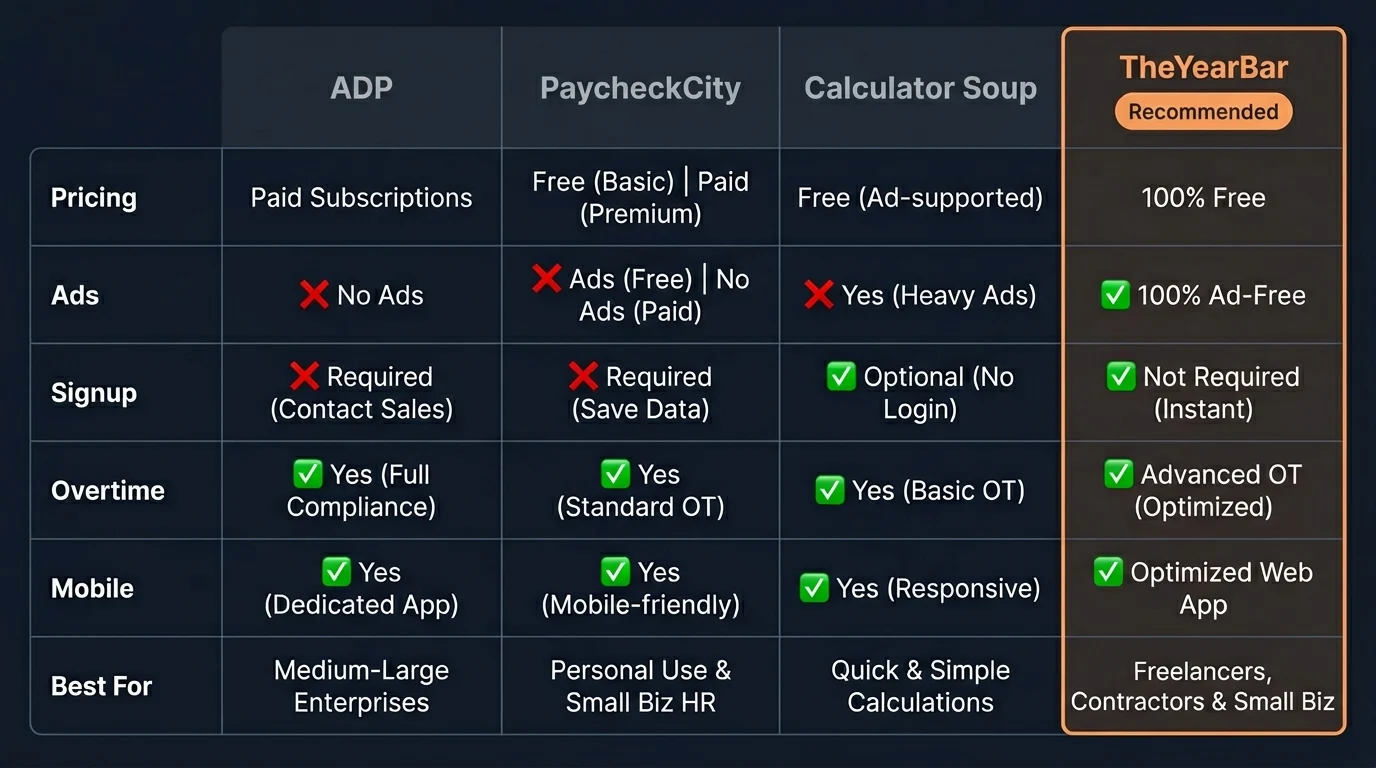
The hours calculator market is crowded. Here’s a structured comparison of the leading tools:
| Feature | ADP Calculator | PaycheckCity | Calculator Soup | TheYearBar |
|---|---|---|---|---|
| Pricing | Free (upsell) | Free + Ads | Free | ✅ 100% Free |
| Ads | Promotional | Heavy | Minimal | ✅ None |
| Signup Required | Partial | No | No | ✅ No |
| Overtime Handling | ✅ Yes | ✅ Yes | Basic | ✅ Yes |
| Decimal Conversion | ✅ Yes | ✅ Yes | No | ✅ Yes |
| Mobile Friendly | Good | Poor | Outdated | ✅ Optimized |
| Tax Calculations | ✅ Full | ✅ Full | ❌ No | Basic |
| Speed | Moderate | Slow | Fast | ✅ Fastest |
ADP Hourly Calculator: Built to funnel users toward ADP’s expensive enterprise payroll subscriptions. Best for companies already on the ADP platform. Overkill for simple hour calculations.
PaycheckCity: Exceptional state-by-state tax simulation accuracy. Heavily ad-supported interface degrades the experience. Strongest choice when you specifically need net pay estimation including local taxes.
Calculator Soup: Fast, clean, no frills, no ads. Only handles basic time subtraction — no wage multiplication, no overtime, no payroll features.
TheYearBar: Purpose-built for work hours calculation with no commercial agenda. No ads, no signup, no data monetization. Handles overnight shifts, break deductions, overtime splits, and decimal conversion natively.
For companies needing project-based billing and client invoice integration, platforms like Harvest often pair with accounting tools such as QuickBooks to automate invoicing and payroll workflows — worth evaluating if your team bills clients by the hour.
🕶️ One thing all these tools share: they keep you in front of a screen for long hours. KLIM Optics Blue Light Blocking Glasses reduce glare and eye strain during extended payroll or timesheet sessions — under $20 on Amazon.
14. Real-World Payroll Scenarios
Scenario 1: Standard Full-Time Employee
- 40 hours worked, $25/hr, no overtime
- Gross pay: 40 × $25 = $1,000.00
Scenario 2: Part-Time with Variable Hours
- Mon: 4h, Tue: 6h, Wed: 5h, Thu: 3h, Fri: 4h = 22 hours, $15/hr
- Gross pay: 22 × $15 = $330.00
Scenario 3: Overtime Week
- 48 hours worked, $20/hr
- Regular: 40 × $20 = $800
- OT: 8 × $30 = $240
- Total: $1,040.00
Scenario 4: California Daily + Weekly OT
- Mon-Thu: 10 hours/day = 40 hours total, $18/hr
- Daily OT (>8hrs): 4 days × 2 hours = 8 hours OT
- Regular: 32 hours × $18 = $576
- OT: 8 hours × $27 = $216
- Total: $792.00
Scenario 5: Night Shift Differential (10% premium)
- 40 hours worked: 30 day hours + 10 night hours, base rate $20/hr
- Regular pay: 40 × $20 = $800
- Night differential: 10 hours × ($20 × 10%) = $20
- Total: $820.00
🕶️ Night shift workers: Hours in front of screens worsen eye strain and disrupt sleep. KLIM Optics Blue Light Blocking Glasses reduce glare during overnight payroll sessions and improve sleep quality after late shifts. Under $20.
Scenario 6: Multiple Pay Rates (Weighted Average Method)
- Week: 30 hours at $15 + 15 hours at $20 = 45 total hours
- Weighted average: (30×$15 + 15×$20) = $750 ÷ 45h = $16.67/hr
- OT rate: $16.67 × 1.5 = $25.00
- OT pay: 5 × $25.00 = $125.00
- Regular pay: $750.00
- Total: $875.00
15. Common Mistakes and Best Practices
The 5 Most Expensive Mistakes
Mistake 1: Confusing time format with decimal format. Entering 7:45 as 7.45 instead of 7.75. This single error costs $6.00 per shift at $20/hour — $1,560/year for a single employee.
Mistake 2: Averaging overtime across a bi-weekly period. FLSA requires calculating OT per 7-day workweek, not averaging across 14 days. Averaging to avoid OT payments constitutes wage theft.
Mistake 3: Ignoring state-specific rules. California mandates daily overtime after 8 hours — a rule that doesn’t exist at the federal level. Operating in California under federal-only rules creates immediate back-wage liability.
Mistake 4: Not tracking compensable break time. Short breaks (5-20 minutes) are legally paid time. Deducting them from hours worked violates FLSA and creates class action exposure.
Mistake 5: Rounding that systematically favors the employer. The 7-minute rule must be applied neutrally. Any pattern of rounding that consistently reduces employee hours becomes a compliance violation.
Best Practices
Use 24-hour format for all time entry to eliminate AM/PM confusion.
Automate decimal conversion. Never manually convert minutes to decimals for payroll — use a calculator or payroll software to prevent the 7.45 vs 7.75 error class.
Audit time records weekly, not monthly. Catching errors within the same pay period prevents costly retroactive corrections and employee disputes.
Forgetting breaks: Meal periods of 30+ minutes where the employee is fully relieved of duty are unpaid. Short breaks of 5–20 minutes are compensable. The distinction matters legally and should be encoded in your tracking system, not left to memory.
Lost time cards: Physical time cards are legal documents. Losing them creates record-keeping violations. Digital systems with automatic cloud backup eliminate this risk entirely. Platforms like Gusto HR automatically archive time records and apply compliant rounding rules, reducing administrative risk significantly.
📚 Recommended Reading for Better Time Management:
| Book | Why It Matters | Link |
|---|---|---|
| 168 Hours — Laura Vanderkam | Reframe how you value each of your 168 weekly hours | Get it on Amazon → |
| Atomic Habits — James Clear | Build time-tracking habits that stick automatically | Get it on Amazon → |
| Deep Work — Cal Newport | Maximize the quality of every billable hour | Get it on Amazon → |
16. Legal Requirements: FLSA and State Laws
FLSA Core Requirements
The Fair Labor Standards Act (FLSA) establishes the baseline requirements for work hours and compensation across the United States:
| Requirement | FLSA Standard |
|---|---|
| Minimum Wage | $7.25/hour (federal) |
| Overtime Threshold | 40 hours/workweek |
| Overtime Rate | 1.5× regular rate |
| Workweek Definition | Fixed, recurring 168-hour period |
| Record Keeping | Mandatory for all non-exempt employees |
| Youth Employment | Restricted hours for workers under 16 |
Exempt vs. Non-Exempt Classification
Not all employees qualify for overtime. The FLSA defines exempt employees based on three tests:
- Salary Basis: Paid a fixed salary regardless of hours worked
- Salary Level: Minimum $684/week ($35,568/year) as of 2024
- Duties Test: Primary duties are executive, administrative, professional, or outside sales
Misclassification liability: Classifying a non-exempt employee as exempt to avoid overtime payments is one of the most common and expensive FLSA violations. Penalties include back wages for all unpaid overtime plus liquidated damages (essentially doubling the amount owed), plus attorney fees.
State Minimum Wages (2024)
| State | Min. Wage | vs. Federal |
|---|---|---|
| Washington | $16.28 | +$9.03 |
| California | $16.00 | +$8.75 |
| New York (NYC) | $16.00 | +$8.75 |
| Florida | $13.00 | +$5.75 |
| Texas | $7.25 | Federal |
17. Frequently Asked Questions
How do I calculate my work hours?
Convert times to 24-hour format, then subtract start from end. Deduct unpaid break time to get net billable hours.
What are decimal hours?
A payroll convention that converts minutes into fractions of 100 for financial compatibility. Example: 45 minutes = 0.75 decimal hours.
What is the formula to convert minutes to decimal?
Divide actual minutes by 60. Example: 30 extra minutes = 30 ÷ 60 = 0.50 hours.
How is overtime pay calculated?
Multiply overtime hours by 1.5× the regular hourly rate, after exceeding 40 hours in a workweek. Example: 5 OT hours at $20/hr = 5 × $30 = $150.
What does “time and a half” mean?
The federal overtime standard: employees earn 150% of their regular hourly rate for each qualifying overtime hour worked.
Is lunch break counted as paid work time?
Generally no. If the meal break is 30+ minutes and the employee is completely relieved of all duties, it’s unpaid. If they perform any work during the break, it’s compensable.
How many total work hours are in a year?
For a full-time employee working 40 hours/week: 40 × 52 = 2,080 hours per year.
What is a time card?
A paper or digital document recording an employee’s exact clock-in and clock-out times daily, used to calculate pay at the end of each pay cycle.
What’s the best app for calculating work hours?
Depends on your needs. Toggl Track excels for freelancers and project tracking. QuickBooks and Gusto handle full payroll. TheYearBar provides the fastest free calculation with no signup.
How do I calculate bi-weekly (biweekly) hours?
Aggregate all hours recorded across the 14-day period (benchmark: ~80 hours). Calculate overtime for each 7-day workweek separately — never average across both weeks.
What does FLSA stand for?
The Fair Labor Standards Act — the primary U.S. federal law governing minimum wage, overtime pay, record-keeping, and youth employment standards.
How long must employers keep payroll records?
FLSA requires basic payroll records for 3 years minimum, and supporting time cards/schedules for 2 years.
What’s the difference between hourly and salary employment?
Hourly employees are paid based on actual hours worked and automatically qualify for overtime. Salaried employees receive a fixed periodic amount and are often exempt from overtime laws.
How is night shift differential calculated?
By adding a premium (typically a percentage like 10% or a flat amount) to the base rate for hours designated as night work — increasing only those specific hours’ pay rate.
What are the best time tracking software options in 2026?
Reliable options include Gusto (integrated HR), QuickBooks Payroll (accounting precision), Harvest (project invoicing), and Toggl Track (simplified tracking).
What’s the difference between free and paid calculators?
Free calculators handle direct math — time subtraction and conversion. Paid platforms provide full environments: automated payments, record archival, official tax withholding.
How can an employee dispute a timesheet error?
Keep personal records of clock-in/out times. Raise the issue with your direct supervisor or HR first. If unresolved, file through official labor channels.
What should I do if I forgot to clock out?
Notify your supervisor or HR immediately to manually correct the entry reflecting your actual departure time, per company policy.
Can my employer round my work hours?
Yes, FLSA allows rounding to the nearest 15 minutes using the 7-minute rule (1-7 min rounds down, 8-14 min rounds up) — but it must be applied neutrally and not systematically reduce employee pay.
How is PTO (Paid Time Off) calculated?
PTO hours are paid but do not count toward the 40-hour overtime threshold. They accrue based on company policy (e.g., 2 hours PTO accrued per 40 hours worked).
18. Conclusion: Master Your Hours
Accurate work hours calculation is not a minor administrative detail — it is the financial foundation connecting employee effort to fair compensation, and the legal bedrock protecting both businesses and workers from costly compliance failures.
Throughout this guide, we’ve covered every critical dimension: from the base-60 vs. base-10 conversion trap that costs businesses $1,560 per employee per year, through the FLSA overtime mandates that generate billions in litigation annually, to the state-specific rules (especially California’s daily overtime) that create compliance minefields for multi-location employers.
The key takeaways:
- Always use decimal hours for payroll calculations — never enter 7:45 as 7.45
- Calculate overtime per 7-day workweek — never average across pay periods
- Track compensable breaks — 5-20 minute rest periods are legally paid time
- Audit weekly — catching errors in the current pay period prevents expensive corrections
- Use digital tools — automation eliminates the human fatigue that multiplies errors
Enter your clock in/out times, deduct breaks, and get instant results in both time and decimal formats. No signup required.
For complete payroll automation: Platforms like QuickBooks Payroll and Gusto handle decimal conversions, overtime classification, tax filings, and multi-year record retention automatically.
Complete Your Time Tracking Library:
| 📚 Book | Why Read It |
|---|---|
| 168 Hours — Laura Vanderkam | Master your 168 weekly hours |
| Atomic Habits — James Clear | Build lasting time-tracking habits |
| Deep Work — Cal Newport | Make every work hour count |